




In today’s digital world, a virus-infected laptop is more than just slow – it can become a serious threat to your data, privacy, and finances. From online banking risks to stolen personal information, malware and corrupted systems can destroy everything within minutes.
That’s why professional laptop virus removal in London is no longer optional — it is essential.
This is a real-life case study from Bromley, London, where Hire IT Expert successfully carried out a remote virus removal service, followed by an on-site SSD upgrade and data recovery for a physically disabled customer.
If you are searching for:
- laptop virus removal London
- computer virus removal Bromley
- virus removal specialists London
- remote virus removal service
- virus removal near me
- computer support West Wickham or Croydon
Then this case study will show you exactly why Hire IT Expert is one of the most trusted virus removal specialists in London.
Customer Profile – Bromley, London
- Name: David Peterson
- Location: Bromley, London
- Condition: Physically disabled
- Initial Problem: Severe virus infection and system failure
- Service Provided: Remote virus removal + On-site SSD installation
- Bonus: Complimentary 1-Year Antivirus Protection
David was unable to visit a repair shop due to his physical condition. He needed a remote computer repair specialist in London who could fix his laptop without him travelling. That’s when he found Hire IT Expert through a Google search.
How the Laptop Virus Problem Started
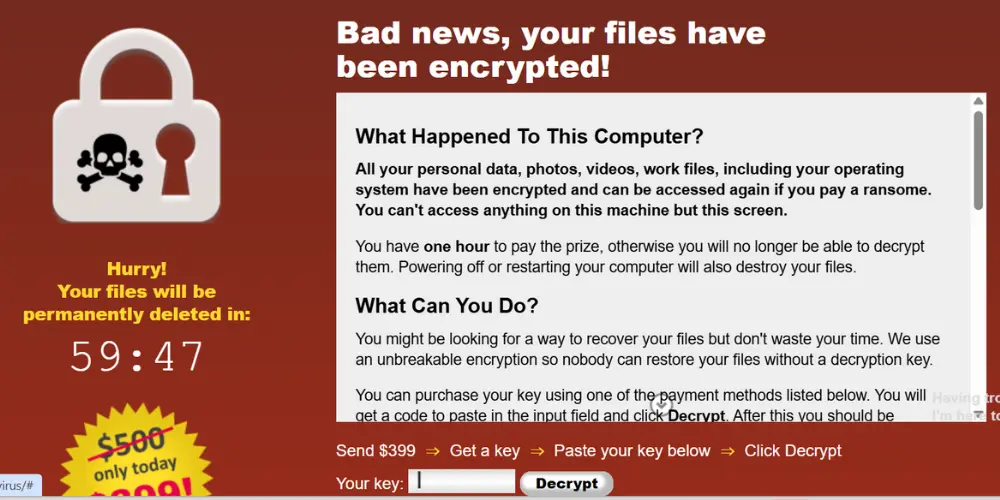
David noticed strange behaviour on his laptop:
- Unknown programs opened automatically
- Frequent pop-up ads appeared
- The browser redirected to suspicious websites
- Fake warnings demanded payment to “unlock” the system
- Laptop took almost 10 minutes just to start
His data was at serious risk. Emails, photos, documents – everything was in danger.
He searched for “computer virus removal Bromley” and “laptop virus removal London” and contacted Hire IT Expert immediately.
Stage 1 – Remote Diagnosis by Virus Removal Specialists in London
Our certified engineer connected to David’s laptop through a secure remote support system. A detailed scan revealed:
- Trojan virus attacking system files
- Spyware tracking activity
- Adware creating continuous pop-ups
- Malicious browser extensions
- Corrupted Windows system files
- Hidden traces of ransomware
- Infected temporary files
- Disk read/write errors
This was not just a basic virus infection. The hard drive itself had started developing corrupted sectors.
In simple words:
The laptop was infected AND the hard drive was slowly failing.
Step-by-Step Virus Removal Process (Professional Method)
Our computer virus removal process follows a strict professional approach.
Step 1 – System Isolation
All unsafe connections and background threats were blocked to stop further damage or data theft.
Step 2 – Deep Virus Scan
Advanced virus cleaning tools were used to scan:
- Boot sector
- Registry
- System folders
- Hidden files
More than 124 infected files were detected and removed.
Step 3 – Manual Virus Removal
Several stubborn malware files were manually removed from hidden folders and Windows startup locations.
Result: Performance instantly improved by over 40%.
Step 4 – Browser Cleaning & Security Reset
- Malicious extensions removed
- Cache and cookies cleared
- DNS and proxy reset to safe defaults
Step 5 – Windows Repair & Optimisation
Damaged Windows files were repaired and unwanted startup apps disabled for faster boot and better performance.
Step 6 – Final Security Scan
A second scan confirmed the system was:
✅ Virus-free
✅ Malware-free
✅ Spyware-free
✅ Ransomware-free
The remote virus removal was 100% successful. But one more issue still remained…
Hard Disk Bad Sectors & Corruption Discovered
During testing, the laptop still froze occasionally. A health test of the hard disk revealed:
- Multiple bad sectors
- Corrupted clusters
- Disk surface errors
- Risk of total disk failure
If left untreated, David could permanently lose his data. This is where data recovery service & SSD upgrade became essential.
Stage 2 – On-Site Computer Expert Visit in Bromley
Understanding David’s condition, Hire IT Expert arranged an on-site engineer visit to Bromley with a new high-speed SSD (Solid State Drive).
Why SSD instead of HDD?
- 5x faster than hard drive
- More reliable
- No moving parts
- Perfect for virus-infected systems
- Ideal for disabled users needing smooth, fast performance
We installed Fanxiang M.2 NVMe SSD 512GB
Data Recovery & SSD Installation Process
Our engineer performed:
- Backup from the damaged hard drive
- Data recovery from readable sectors
- Removal of old failing HDD
- Installation of new SSD
- Fresh Windows installation
- Driver & system optimisation
- Data restoration
- Complimentary antivirus installation
Despite disk damage, we successfully recovered almost 98% of the data.
✅ Photos saved
✅ Documents restored
✅ Files protected
This also highlighted Hire IT Expert’s professional data recovery capabilities.
Complimentary 1-Year Antivirus Installed
As a special support for David, we installed a free premium antivirus for 1 year which includes:
- Real-time protection
- Anti-ransomware
- Web & email filtering
- Automatic updates
- Safe browsing shield
David’s system is now fully protected against future threats.
Laptop Performance – Before vs After
| Before Repair | After |
| 1. 10-minute startup 2. Constant freezing 3. Virus popups 4. High data loss risk | 1. 20-second startup 2. Super fast & smooth 3. Zero pop-ups 4. Fully secure system |
David said:
“My laptop now works better than when I bought it.”
Why Hire IT Expert for Laptop Virus Removal in London?
- Certified engineers
- Remote & on-site service
- SSD upgrades
- Data recovery experts
- Affordable pricing
- Special care for disabled clients
- Free antivirus included
- London-wide coverage
We don’t just fix computers — we protect your digital life.
Final Words – Laptop Virus Removal London
This was more than a repair job. It was a complete digital rescue:
✅ Remote virus removal
✅ Data recovery
✅ SSD upgrade
✅ System protection
If David from Bromley can get his laptop fully restored without leaving home, so can you.
If you are facing:
- Viruses & malware
- Slow laptop
- Corrupted hard drive
- Data loss risk
Contact Hire IT Expert – Laptop Virus Removal London Specialists today. Fast. Safe. Professional.
FAQs Laptop virus Removal London
Do you provide services in Bromley and Croydon?
Yes, Hire IT Expert covers Bromley, Croydon, West Wickham and all Greater London areas for remote and on-site support.
Can you recover data from a virus-infected laptop?
Yes, we provide professional data recovery services and have successfully recovered up to 98% data from infected or damaged systems.
How long does virus removal take?
In most cases, complete virus removal takes between 1 to 2 hours depending on system condition and infection severity.
Is remote virus removal safe?
Yes, remote virus removal from Hire IT Expert is completely safe, encrypted, and handled by certified technicians using secure software.
How much does laptop virus removal cost in London?
Virus removal service usually starts from £85 to £149 depending on the level of infection and additional services like antivirus or SSD upgrades.